Android Auto and Apple CarPlay for Audi Q7 II (2015 to 2024)
Android Auto and Apple CarPlay for Audi Q7 II (2015 to 2024) - Standard screen (7 inches) is backordered and will ship as soon as it is back in stock.
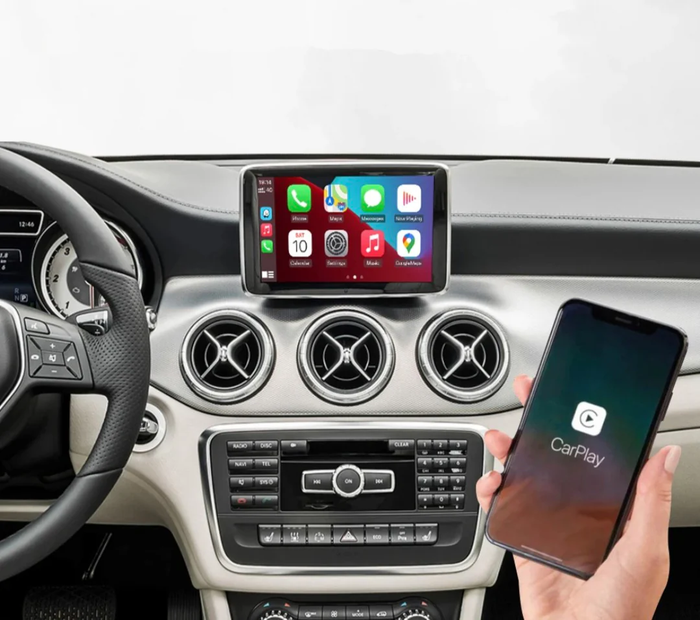
Transform your Audi Q7 II into a connected multimedia center with our Android Auto and Apple CarPlay module
YOUR SMARTPHONE APPS IN THE CAR

Enjoy a connected driving experience , where all your essential apps seamlessly integrate with your vehicle's screen. No more juggling between your phone and your dashboard: everything you need is safely and distraction-free at your fingertips .
Navigation, communication, entertainment… Transform your Audi into a smarter, more intuitive car, where every journey becomes simpler and more enjoyable.
YOUR MUSIC EVERYWHERE

Enjoy an immersive multimedia experience thanks to full compatibility with leading streaming apps . Whether you're a music, podcast, or video enthusiast, our CarPlay/Android Auto connected box for the Audi Q7 lets you access all your favorite content directly on your vehicle's original screen. Spotify, Apple Music, Deezer, and Amazon Music integrate seamlessly to deliver optimal sound quality through your Audi's speakers.
Enjoy the native interface of music applications , with the ability to browse your playlists, albums and radio stations without touching your smartphone.
FOLLOW YOUR FAVORITE VIDEOS

In addition to music, this device also supports YouTube and other video platforms , ideal for enjoying visual content while stopped. Whether you're waiting for an appointment or keeping your passengers entertained, you can watch high-definition videos with optimal sound quality.
Thanks to plug & play integration and compatibility with steering wheel controls and the MMI touchpad , navigating between applications and adjusting the volume becomes child's play.
CONNECTED NAVIGATION

No more traffic jams and outdated information! Thanks to Google Maps, Waze or Apple Maps , you benefit from an always up-to-date GPS , displayed directly on the screen of your Audi Q7.
Enjoy real-time traffic information , optimized routes, and alerts for speed cameras and speed limits. Whether you're in the city or on the highway, your navigation is smooth and precise . No need to handle your phone: everything is controlled via the steering wheel controls, the MMI touchpad, or through Siri/Google Assistant voice control .
YOUR VOICE ASSISTANT

With Siri integration via CarPlay and Google via Android Auto , you stay in control without taking your eyes off the road or letting go of the steering wheel. Need to send a message, make a call, or plan a route? Simply say "Hey Siri" or "Hey Google" to activate your voice assistant and give it your instructions.
You can also ask it to read your notifications, launch your favorite playlist on Spotify or Apple Music , or even find a gas station on Maps .
STAY IN CONTROL

Our module allows you to control the functions via the original AUDI radio buttons : the rotary dial, steering wheel controls, and center console buttons are retained. (A long press on the "BACK" button allows you to switch to the original system/CarPlay or Android Auto.)
REARVIEW CAMERA

Installing our CarPlay/Android Auto adapter for the Audi Q7 allows you to retain the use of your original reversing camera . When you shift into reverse, the display automatically switches to the camera image, along with guide lines if your vehicle is equipped with them.
This allows you to maintain optimal parking assistance while benefiting from the modern features of CarPlay and Android Auto. Enjoy the best of both worlds : advanced connectivity without compromising the original equipment of your Audi!
KIT CONTENTS
- Carplay/Android Auto connected box
- Complete wiring harness
(The case color and wiring may vary depending on the model chosen)

MULTIPLE VERSIONS AVAILABLE
Several modules are available depending on your multimedia system:
- Version for standard screen ("Media driver: DEV")
- Widescreen version ( "Media driver: CLU")
Check your car's system version by following the steps below:
1. Press the "Setup" or "Menu" button on the radio
2. Go to "Settings"
3. Scroll down to "Information Version"
4. Look up the first letters and numbers of the software version

Our team is available to answer any questions you may have regarding the installation and compatibility of our smart home device. We also provide a complete installation guide in French with your purchase.
Looking to enhance the look of your Audi Q7? Visit our accessories shop. And make your choice!
Cet article est compatible avec les modèles suivants :
- Q7 / SQ7 II (2015-2025)
Votre modèle n'est pas référencé ? Contactez-nous pour en savoir plus.
Nous sommes également joignables au +33 1 89 70 51 52 — un expert vous répondra rapidement.

Fiabilité, qualité et expertise : nous sélectionnons les meilleurs accessoires pour sublimer votre Audi. Un large choix, un service client réactif et une expédition rapide depuis nos entrepôts en France et en Europe pour un achat en toute sérénité.
FAQ
Comment fonctionne le Carplay ?
Comment fonctionne le Carplay ?
Comment savoir si ma voiture est compatible Carplay ?
Comment savoir si ma voiture est compatible Carplay ?
Comment avoir Carplay dans une voiture non compatible ?
Comment avoir Carplay dans une voiture non compatible ?
Comment mettre le Carplay ?
Comment mettre le Carplay ?
Comment activer Apple Carplay sur ma voiture ?
Comment activer Apple Carplay sur ma voiture ?
Comment fonctionnent Carplay et Android Auto
Comment fonctionnent Carplay et Android Auto
Produits similaires
View allDes milliers de références
-
Accessoires Extérieurs