Android Auto and Apple CarPlay connected car radio for Volkswagen Golf 5 (2003 to 2007)
Android Auto and Apple CarPlay connected car radio for Volkswagen Golf 5 (2003 to 2007) - Without Dynaudio audio system is backordered and will ship as soon as it is back in stock.
Transform your Volkswagen Golf 5 into a connected car with our CarPlay & Android Auto box
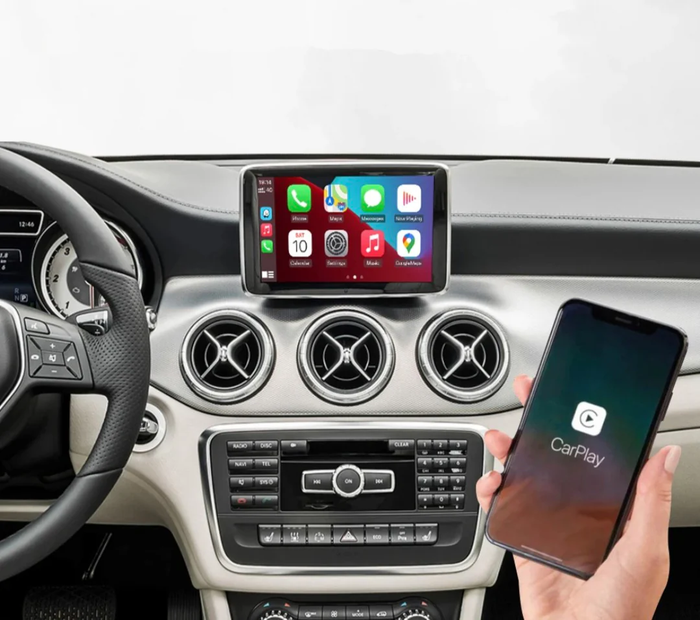
Upgrade your VW Golf with our latest generation CarPlay/Android Auto touchscreen module . Thanks to our plug & play unit, access all your smartphone apps directly from the original screen, smoothly, intuitively, and wirelessly.
🎵 Music, 📍 GPS, 🎥 Videos, 📱 Communication… your driving experience becomes more modern, safer, and more enjoyable. Say goodbye to phone holders and bulky cables: your dashboard transforms into a true in-car multimedia center.

📱 Your favorite apps in your VW

Thanks to the full integration of CarPlay and Android Auto , you can access your smartphone's world directly on your Golf's original screen.
Enjoy your apps as if they were built into the car, without the need for risky handling while driving. Safely access your music, messages, calls, GPS, or podcasts.
🗺️ Advanced GPS Navigation: Google Maps, Waze, Apple Maps

Enjoy smart, always up-to-date GPS navigation with direct access to apps like Google Maps , Waze , and Apple Maps . Benefit from real-time traffic updates, radar alerts, voice search, and optimized routes—all displayed in high quality on your VW's original screen.
No more unreadable smartphone screens: your browsing becomes smooth, intuitive and secure.
🎶 Multimedia & Streaming – Your music and videos at your fingertips

Whether you're a fan of Spotify, Deezer, Apple Music or even YouTube , enjoy direct access to your favorite content with optimal sound quality via your car's audio system.
Browse your playlists, change tracks, or start a video (while stopped) without ever touching your phone. Perfect for making every journey more enjoyable, even for your passengers.
🗣️ Built-in Siri/Google Assistant

Stay focused on the road while maintaining control.
Activate Siri or Google Assistant directly from your steering wheel or via voice command, and let your assistant take care of the rest: send messages, launch a playlist, find a gas station… everything is done by voice, without taking your eyes off the road.
🔄 Keep the original controls and buttons

Our module is 100% compatible with original VW controls : you retain steering wheel controls and system control without any modification to the original equipment.

A long press on the steering wheel button (1) or a short press on the button (2) allows you to navigate between your original radio system and the connected Carplay/AndroidAuto radio.

Pressing and holding the MEDIA button (3) for 3 seconds allows you to access the connected system. Pressing and holding the VOICE button (4) for 10 seconds restarts the connected car radio system.
The TRAFFIC button (5) can be used as a Back button in the menus, the MENU button (6) displays the Carplay/AndroidAuto menu, the control button (7) has several functions: a short press to Confirm, a long press to activate the Voice Assistant, and volume control.
🎥 Original reversing camera in perfect condition

No need to compromise on the optional equipment of your VW Golf VII! Our CarPlay / Android Auto box is designed to preserve your car's original reversing camera .
When reversing, the screen automatically switches to the camera display, with guide lines if your vehicle is equipped with them.
📦 Kit contents

🔧 Plug & Play Installation
Our connected box plugs directly into the output of your CD player installed in the glove box of your VW Golf 5, no reprogramming or coding is necessary.
ℹ️ Important note:
The wiring differs only depending on whether or not the original steering wheel controls are present.
Refer to the diagram below to identify the correct wiring configuration before installation.

✅ Compatibility
Our Apple Carplay/AndroidAuto boxes are compatible with the entire Volkswagen Golf 5 range from 2003 to 2007.

Want to go further? Discover our accessories for the Volkswagen Golf 5 in our online shop.
Cet article est compatible avec les modèles suivants :
- Golf 5 (2003-2008)
Votre modèle n'est pas référencé ? Contactez-nous pour en savoir plus.
Nous sommes également joignables au +33 1 89 70 51 52 — un expert vous répondra rapidement.

Fiabilité, qualité et expertise : nous sélectionnons les meilleurs accessoires pour sublimer votre Volkswagen. Un large choix, un service client réactif et une expédition rapide depuis nos entrepôts en France et en Europe pour un achat en toute sérénité.
FAQ
Comment fonctionne le Carplay ?
Comment fonctionne le Carplay ?
Comment savoir si ma voiture est compatible Carplay ?
Comment savoir si ma voiture est compatible Carplay ?
Comment avoir Carplay dans une voiture non compatible ?
Comment avoir Carplay dans une voiture non compatible ?
Comment mettre le Carplay ?
Comment mettre le Carplay ?
Comment activer Apple Carplay sur ma voiture ?
Comment activer Apple Carplay sur ma voiture ?
Comment fonctionnent Carplay et Android Auto
Comment fonctionnent Carplay et Android Auto
Produits similaires
View allDes milliers de références
-
Accessoires Extérieurs