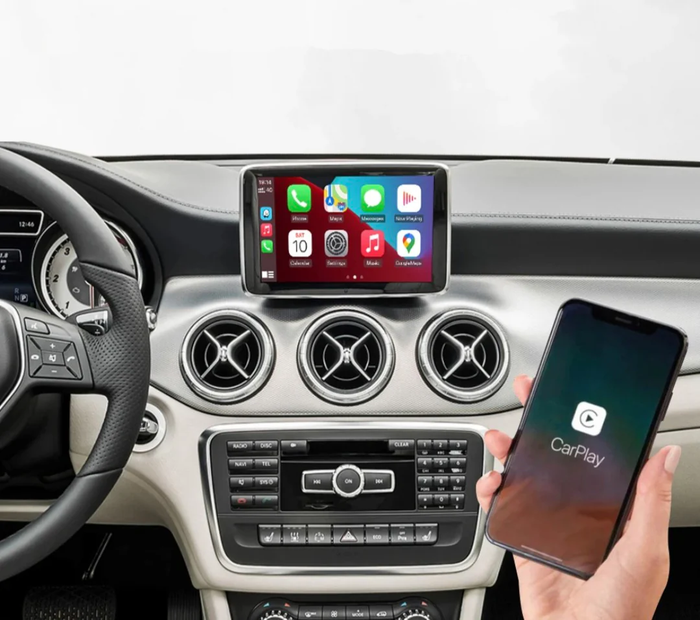
Apple CarPlay and Android Auto car radio interface for BMW 3 Series F30 NBT (2011 to 2019)
Apple CarPlay and Android Auto car radio interface for BMW 3 Series F30 NBT (2011 to 2019) - NBT (pre-facelift) is backordered and will ship as soon as it is back in stock.
CarPlay & Android Auto module for BMW 3 Series F30 – The essential upgrade
Give your BMW 3 Series F30 a new lease on life by integrating today's most sought-after connected features. Our CarPlay & Android Auto module allows you to use key smartphone apps directly on your vehicle's original screen, without any system modifications or cumbersome cables.
This technology transforms your driving experience: smoother navigation, advanced multimedia, simplified communication and safer driving.

Redesigned connectivity for your BMW

Once installed, the system integrates seamlessly with the existing interface. You can access your music, GPS, messages, and calls from the central screen as if they were part of the original BMW system.
All essential functions are quickly accessible, without any risky manipulation on your mobile phone.
Real-time GPS navigation on the original screen

Google Maps, Waze, Apple Maps : you benefit from the best GPS solutions on the market with traffic information, instant route recalculation and voice search.
The maps are displayed in large format directly on the screen of the 3 Series F30, for a serene and safe driving experience.
High-quality embedded multimedia

Enjoy your favorite platforms ( Spotify, Deezer, Apple Music, YouTube, etc. ) through the BMW audio system for powerful and clear sound.
Your passengers can also browse the content without disrupting your driving.
Integrated voice assistant for a more relaxed driving experience

Siri or Google Assistant take over depending on your smartphone. You control everything with your voice: reading messages, searching for addresses, managing playlists, or making one-off requests.
Stay focused on the road, the system will take care of the rest.
A plug & play installation without altering your BMW

No dashboard modifications or complex coding required: our module is designed to work with the original controls, including:
- iDrive dial
- Steering wheel controls
- BMW interface and menus
You retain all the features already present in your Series 3.
Rearview camera perfectly secured

Our interface is fully compatible with the original camera. When reverse gear is engaged, the display automatically switches to the camera view and retains the dynamic lines if your BMW is equipped with them.
No loss of equipment or options.
Kit contents
- CarPlay / Android Auto connected box
- Plug & play wiring harness
- Installation instructions


Compatibility with your vehicle
To ensure optimal integration, two versions of the module are available depending on your iDrive system:
| System | Compatible models |
|---|---|
| NBT | Pre-facelift: 2011 to 2015 |
| EVO | After facelift (LCI): 2015 to 2019 |
Need help identifying your iDrive? Contact us, we'll guide you in moments with just a photo of the screen.


Frequently Asked Questions
How can I tell if my BMW is CarPlay compatible?
To check compatibility, simply identify your iDrive system. On the BMW 3 Series F30, there are primarily two versions: NBT (2011–2015) and EVO (2016–2019). The NBT interface displays classic menus, while the EVO features colored icons (see our thumbnail in the ' Compatibility ' section) . You can also send us a photo of the iDrive screen with it switched on: we'll confirm compatibility within minutes.
Is the BMW F30 compatible with CarPlay?
Yes, all BMW F30 models are compatible with our interface. Our box adds CarPlay and Android Auto to models from 2011 to 2019, even if the functionality is not factory-installed.
Can I add CarPlay to my BMW?
Yes! Our module installs plug & play behind the original screen, without coding or modification. You keep the iDrive controller, the reversing camera, and all original settings.
How do I activate CarPlay on an F30?
After installation, connect your iPhone via Bluetooth and then Wi-Fi; CarPlay will automatically appear on the original screen. Siri remains usable via voice commands on the steering wheel.
Want to go further? Discover our accessories for BMW 3 Series F30 in our online shop.
Cet article est compatible avec les modèles suivants :
- 3 Series F30 / M3 F80 (2011-2019)
Votre modèle n'est pas référencé ? Contactez-nous pour en savoir plus.
Nous sommes également joignables au +33 1 89 70 51 52 — un expert vous répondra rapidement.

Fiabilité, qualité et expertise : nous sélectionnons les meilleurs accessoires pour sublimer votre BMW. Un large choix, un service client réactif et une expédition rapide depuis nos entrepôts en France et en Europe pour un achat en toute sérénité.
FAQ
Comment fonctionne le Carplay ?
Comment fonctionne le Carplay ?
Comment savoir si ma voiture est compatible Carplay ?
Comment savoir si ma voiture est compatible Carplay ?
Comment avoir Carplay dans une voiture non compatible ?
Comment avoir Carplay dans une voiture non compatible ?
Comment mettre le Carplay ?
Comment mettre le Carplay ?
Comment activer Apple Carplay sur ma voiture ?
Comment activer Apple Carplay sur ma voiture ?
Comment fonctionnent Carplay et Android Auto
Comment fonctionnent Carplay et Android Auto
Produits similaires
View allDes milliers de références
-
Accessoires Extérieurs